
While you obsess over content and backlinks, 70% of your pages are invisible to AI. And you’ll never know why. Your competitors aren’t doing this work either. Which means the ones who do will dominate everything.
AI sees code. And if your code is a mess, you don’t exist.
Let me be more specific about what just happened to your website this morning while you were checking your email.
Google’s crawler arrived at your homepage at 3:47 AM. It tried to render the page. It waited 8 seconds for your JavaScript to load. It hit a render-blocking script. It encountered a redirect chain. It found 47 broken internal links. It discovered that 60% of your images had no alt text. It noticed your XML sitemap hadn’t been updated in 18 months and contained 200 URLs that returned 404 errors.
And then it left.
It didn’t index your new product pages. It didn’t see your carefully researched blog posts. It didn’t recognize your updated service descriptions. It simply allocated its limited crawl budget elsewhere. To your competitors whose technical foundations weren’t a disaster.
You spent $48,000 on content last year. You paid $18,000 on link building. You spent $30,000 on a website redesign that won a design award.
And you spent zero dollars fixing the broken robots.txt file that’s been blocking 70% of your pages from being indexed for the past six months.
This is why you’re invisible to AI.
This is the seventh article in the “AI Traps: Build the Base or Bust” series. We have covered category pages, product schemas, customers and product reviews, product syndication, external validation, and local citations. This week, we confront the most unglamorous, least sexy, highest ROI work in digital marketing: technical SEO.
Because if AI systems cannot crawl your website efficiently, if your pages are not indexed correctly, if your site loads too slowly for voice search expectations, none of the other work matters.
Your content can be perfect. Your NAP data can be flawless. Your local authority can be unmatched.
But if the technical foundation is broken, you are building on sand.
The Crawl → Index → Rank Funnel That Everyone Ignores:
Here is what most companies fundamentally misunderstand about how search works.
They think: “If I publish content, Google will find it, index it, and rank it.”
No. That is not how this works. That has never been how this works.
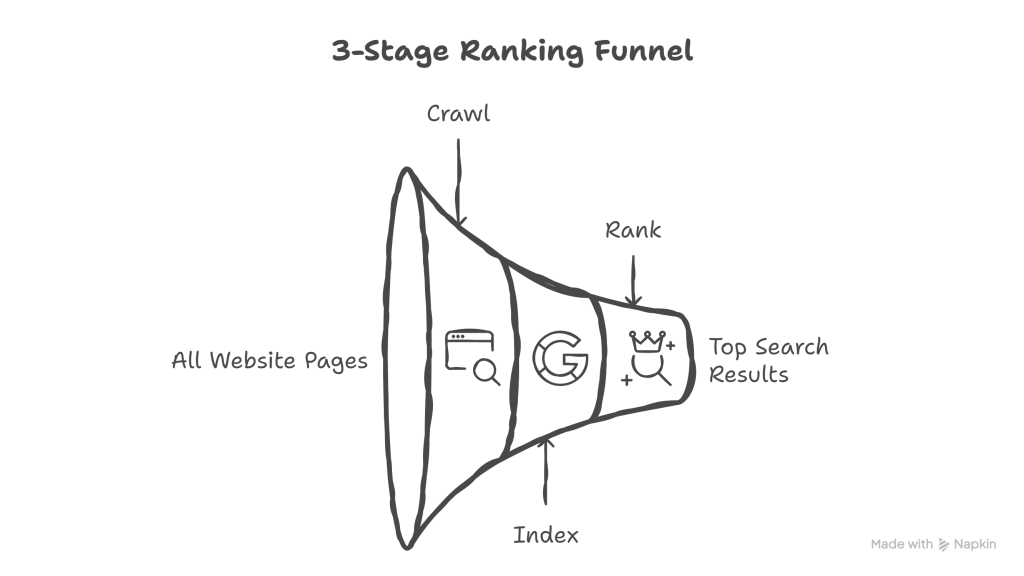
There is a three-stage funnel, and most content never makes it through:
Stage 1: Crawl Can search engines even see your pages? Can AI crawlers access your content? Or are there technical barriers preventing discovery?
Stage 2: Index of the pages that get crawled, which ones does Google deem worthy of including in its index? Which ones have enough value, uniqueness, and quality to be stored and considered for search results?
Stage 3: Rank of the pages that make it into the index, which ones are trustworthy and relevant enough to actually appear in the top 10 results? (Or top 3 for local search.)
Most companies obsess over Stage 3 (ranking) while completely ignoring Stages 1 and 2.
They hire agencies to “improve rankings.” They write more content to “rank higher.” They build links to “boost authority.”
But here is the brutal reality: if your pages never make it past the crawl stage, or if they get crawled but never indexed, none of that ranking work matters.
The leak in the funnel is massive.
According to data from thousands of technical audits, the average website has 70% of its pages excluded from Google’s index. Not ranked poorly. Not on page 10. Excluded entirely.
Seventy percent of your content is invisible.
Why? Because of technical issues that nobody is monitoring, nobody is fixing, and in most cases, nobody even knows they exist.
And you cannot skip stages. You cannot optimize for ranking if your pages are not indexed. You cannot optimize for indexing if your pages are not being crawled.
The funnel flows in one direction: Crawl → Index → Rank.
Fix crawl first. Then fix the index. Then worry about ranking.
There Is No AEO Without Technical SEO:
Let me address the elephant in the room.
Right now, there is a rush toward Answer Engine Optimization (AEO) and Generative Engine Optimization (GEO). Everyone wants their content featured in AI-generated answers. Everyone wants to appear in ChatGPT responses, Google’s AI Overviews, and Perplexity citations.
And that is good. That is the right direction.
But here is what nobody wants to hear: you cannot optimize for AI-powered search if your technical foundation is broken.
AEO is not a replacement for SEO. It is a layer on top of SEO.
GEO is not a new discipline that makes technical optimization obsolete. It is an advanced tactic that requires technical excellence as a prerequisite.
Think about it this way: if you wanted to install smart home technology (AI-powered thermostats, voice-activated lighting, automated security systems) you would need a house with electricity first.
You cannot install smart appliances in a house with no power.
That is precisely what companies are doing right now. They are trying to optimize for AI-powered answer engines while their websites have:
- Broken crawl accessibility.
- Pages excluded from the index.
- Load times exceeding 10 seconds.
- Invalid or missing structured data.
- Mobile experiences that fail basic usability tests.
And then they wonder why AI systems don’t cite their content.
Because AI cannot cite what it cannot crawl. AI cannot recommend what it cannot index. AI cannot trust what it cannot verify.
Technical SEO is not “old SEO” that you can skip in favor of shiny new AI tactics. Technical SEO is the language AI speaks. Structured data, clean HTML hierarchy, fast load times, proper schema markup. These are the signals AI uses to determine whether your content is trustworthy, legitimate, and worth including.
If your technical foundation is solid, AI optimization compounds. Every piece of content you create gets crawled faster, indexed reliably, and considered for citations.
If your technical foundation is broken, you are pouring resources into a leaky bucket.
The Google Search Console Abandonment Crisis:
Let me ask you a direct question: when was the last time you logged into Google Search Console?
If the answer is “I don’t know” or “What’s Google Search Console?” or “We have access, but I’ve never actually used it,” you are not alone.
Most companies have Google Search Console set up. Most have submitted their sitemap at some point. And most have completely abandoned it.
Here is what is happening right now while nobody is watching:
The Notification Graveyard:
Google Search Console sends email notifications when critical issues occur. Pages removed from the index. Manual penalties applied. Core Web Vitals failing. Mobile usability problems detected.
And those emails go to:
- An old employee who left the company two years ago.
- A shared inbox that nobody monitors.
- A spam folder because someone filtered them as “automated reports”.
- The agency that handles your website but never actually reads the alerts.
The result?
Last month, Google removed 500 pages from your index because of duplicate content issues. You never knew.
Three weeks ago, a manual action was applied to your site for unnatural links. Nobody noticed.
Your mobile experience has been flagged as “Poor” in Core Web Vitals for the past 6 months. No one checked.
Your XML sitemap contains 1,200 URLs, but 400 of them return 404 errors, so Google stopped trusting it. Nobody reviewed the sitemap status.
This is the abandonment crisis.
And it gets worse with Bing Webmaster Tools.
Most companies do not even have Bing Webmaster Tools set up. They assume Bing does not matter. They assume nobody uses Bing.
But here is the reality: ChatGPT uses Bing’s index. When someone asks ChatGPT for recommendations, it searches Bing, not Google.
If you are not monitoring Bing Webmaster Tools, you have no idea how AI sees your website.
What You Should Be Checking Weekly:
Open Google Search Console right now (not later, not next week, right now) and review:
- Index Coverage Report: How many pages are indexed vs. excluded? Why are pages excluded? (Duplicate content? Noindex tags? Crawl errors?) Are your most important pages actually in the index?
- Crawl Stats: How many pages is Google crawling per day? Is Google wasting crawl budget on low-value pages (thank-you pages, filters, parameters)? Are there crawl errors spiking suddenly?
- Core Web Vitals: Are your pages passing the performance thresholds? Which URLs have poor LCP, FID, or CLS scores? Is mobile performance worse than desktop?
- Manual Actions: Do you have any manual penalties applied? If yes, why were you not alerted?
- Sitemaps: Is your sitemap being processed correctly? Are there errors in the submitted URLs? When was it last updated?
What You Should Be Checking Monthly:
- Performance Report: Which queries are losing visibility? Which pages are declining in impressions? Are there sudden drops that indicate technical issues?
- Experience Report: Any new mobile usability problems? Are pages becoming less usable over time as features are added?
- Enhancements: Are there new schema errors appearing? Is structured data being validated correctly?
If you are not checking these reports weekly and monthly, you are flying blind.
And every day you ignore these signals, you are losing visibility, losing traffic, and losing revenue to competitors who actually monitor their technical health.
The Crawl Stage: Can AI Even See Your Pages?
Let’s start at the beginning of the funnel: crawl.
Before AI can index your content, before it can rank your pages, before it can cite your information in a generated answer, it has to see your content.
And for a shocking number of websites, AI crawlers arrive, look around, and leave without seeing anything worthwhile.
Here are the most common crawl blockers:
1. Broken robots.txt File:
Your robots.txt file tells search engines which parts of your site they are allowed to crawl.
Most websites have this file. Most have never actually looked at it. And many are accidentally blocking critical sections of their site.
Go to yourwebsite.com/robots.txt right now and look at it. Does it say:
User-agent: *
Disallow: /blog/
Congratulations, you just blocked your entire blog from being crawled. Every article you have ever written is invisible.
Or maybe it says:
User-agent: Googlebot
Disallow: /products/
Great. Your product pages cannot be indexed.
This happens more often than you think. A developer adds a line during staging to prevent crawling before launch. Nobody removes it after launch. Two years later, half the site is blocked, and nobody knows why rankings never improved.
2. JavaScript-Heavy Sites That Render After Crawl:
Modern websites love JavaScript frameworks. React, Angular, Vue. Beautiful, dynamic, interactive experiences.
But here is the problem: many crawlers struggle with JavaScript rendering.
If your entire page content loads via JavaScript after the initial HTML is delivered, crawlers might see an empty page. They might see loading spinners. They might see placeholder text. But they do not see your actual content.
And if they cannot see your content, they cannot index it.
3. Orphaned Pages (No Internal Links Pointing to Them):
You published 50 new blog posts last year. You created 200 new product pages. You added detailed service descriptions.
But did you link to them from anywhere?
If a page has zero internal links pointing to it, crawlers cannot discover it. They navigate your site by following links. If there is no path to a page, it might as well not exist.
Run a full site crawl using tools like Screaming Frog, Sitebulb, or DeepCrawl. Look for orphaned pages (pages that exist but have no inbound internal links). Those pages are invisible.
4. Redirect Chains (Multiple Hops to Reach Final URL):
You reorganized your site structure. You changed URL patterns. You moved content around.
And every time you did that, you added a redirect:
- yoursite.com/old-page → yoursite.com/new-page
- Then later: yoursite.com/new-page → yoursite.com/final-page
- Then later: yoursite.com/final-page → yoursite.com/current-page
Now, when a crawler tries to access the original URL, it has to follow three redirects to reach the final destination.
Each redirect wastes crawl budget. Each redirect increases the likelihood that the crawler will give up. Redirect chains longer than two hops often result in pages being de-prioritized or ignored entirely.
5. Server Errors During Crawl (500s, Timeouts):
Your server cannot handle the traffic. When Google’s crawler arrives during peak hours, the server times out. The crawler gets a 500 error. It tries again later and gets another error.
Eventually, Google assumes the page is unreliable and stops trying.
You never see this in your analytics because real users are not hitting these pages during the exact moments crawlers are. But the crawl is failing, and your pages are not being updated in the index.
How to Diagnose Crawl Issues:
- Open Google Search Console → Settings → Crawl Stats.
- Look at crawl requests per day, pages crawled, and response times.
- Check for spikes in errors or declines in crawl rate.
- Review your robots.txt file manually.
- Run a full site crawl using professional crawling tools to identify orphaned pages, redirect chains, and broken links.
- Check server logs to see how crawlers are actually interacting with your site.
Fix these crawl issues first. If crawlers cannot see your content, nothing else matters.
The Index Stage: Does AI Deem Your Pages Worthy?
You fixed crawl issues. Google can now see your pages.
But that does not mean Google will index them.
Being crawled and being indexed are two completely different things.
Google crawls billions of pages. It does not index all of them. It decides which pages are valuable enough to include in its index and which are not worth the storage space.
Here is the reality: most of your pages are not indexed.
Go to Google and type: “site:yourwebsite.com“.
Look at the number of results. Is it close to the actual number of pages on your site? Or is it 30% of your total pages?
If the number is lower than expected, you have an indexing problem.
Why Pages Do Not Get Indexed:
1. Duplicate Content (Canonical Issues, Parameter URLs):
You have the identical product listed in three different categories. You have filter URLs that create variations of the same page. You have print-friendly, mobile, and AMP versions.
Google sees all of these as duplicates. It picks one version to index (usually not the one you want) and ignores the rest.
Or worse, you never set canonical tags correctly, so Google guesses which version is the “real” one. And it often guesses wrong.
2. Thin Content (Too Short, Too Generic, AI Sees No Value):
You have category pages with 50 words of generic text: “Welcome to our products page. We have great products. Browse below.”
Google looks at that page and decides: this adds no value. It is just a list of links. There is nothing unique here. Not worth indexing.
Or you have blog posts that are 200 words long with no depth, no insights, and nothing that differentiates them from the thousand other articles on the same topic. Google skips them.
3. Noindex Tag (Accidentally Left On After Staging):
During development, your staging site had noindex tags to prevent it from appearing in search results before launch.
You launched the site. You removed most of the noindex tags. But you missed a few. Maybe on your product pages. Maybe on your blog category pages.
Those pages get crawled. But the noindex tag tells Google: “Do not include this in your index.”
And Google obeys.
4. Blocked by Robots.txt (Conflicts With Crawl Directives):
This is a tricky one. Your robots.txt file says: “Disallow: /resources/”
But your sitemap includes all your resource pages.
Google’s crawler follows the robots.txt directive and does not crawl those pages. But the sitemap says they are important. The conflict creates confusion, and those pages often do not get indexed.
5. Soft 404s (Page Exists But Has No Real Content):
You have pages that technically return a 200 status code (success), but they have no actual content. Maybe they are placeholder pages. Perhaps they are thin affiliate pages. Perhaps they are auto-generated pages with no substance.
Google sees these as “soft 404s” (pages that exist but should not). It excludes them from the index.
6. Low-Quality Signals (Google Chooses Not to Index):
This is the hardest one to diagnose. Google crawls the page. It sees the content. But based on quality signals, user engagement data, and comparisons with other content on the same topic, Google decides this is not worth indexing.
It does not tell you why. It just excludes the page.
How to Fix Indexing Issues:
- Open Google Search Console → Index → Coverage.
- Look at the “Excluded” tab (these are pages Google chose not to index).
- Identify patterns: Are all product pages excluded? Are blog posts from a specific category excluded?
- Click into specific exclusion reasons: “Duplicate without user-selected canonical” → Fix canonical tags “Crawled – currently not indexed” → Improve content quality “Discovered – currently not indexed” → Add internal links, improve relevance “Excluded by ‘noindex’ tag” → Remove noindex tags from important pages.
- Fix the underlying issues (canonicals, thin content, noindex tags).
- Re-submit your sitemap.
- Request indexing for high-priority pages using the URL Inspection tool.
- Monitor weekly until indexing improves.
The difference between 30% of your pages indexed and 80% of your pages indexed is the difference between mediocre visibility and dominant visibility.
The Speed Stage: AI Expects Sub-3-Second Performance.
Now let’s talk about speed.
You might think: “Speed is a user experience issue. What does it have to do with AI?”
Everything.
Here is why speed matters for AI-powered search:
- Voice search results load under 4.6 seconds on average. If your page takes 8 seconds to load, it will never be selected for a voice search result.
- AI crawlers have a limited time per site. If your pages are slow, crawlers spend their entire allocated time waiting for pages to load instead of actually crawling content. Slow site = fewer pages crawled = less content indexed.
- Core Web Vitals are trust signals. Google uses page experience as a ranking factor. More importantly, AI systems use performance metrics as proxies for site quality. Fast sites = professional, well-maintained, trustworthy. Slow sites = neglected, low-quality, unreliable.
The Three Core Web Vitals:
Google measures page performance using three specific metrics:
1. LCP (Largest Contentful Paint): How fast does your main content load?
- Target: Under 2.5 seconds.
- Measures: When the most significant visible element (hero image, headline, video) appears on screen.
- Why it matters: If users see a blank screen for 5 seconds, they leave.
2. FID (First Input Delay): How quickly can users interact with your page?
- Target: Under 100 milliseconds.
- Measures: Time between user action (click, tap) and browser response.
- Why it matters: If buttons do not respond immediately, users assume the site is broken.
3. CLS (Cumulative Layout Shift): Does your page jump around while loading?
- Target: Under 0.1.
- Measures: How much visible content shifts position during page load.
- Why it matters: Users click a button, but an ad loads and shifts everything down, so they click the wrong thing.
If your pages fail these thresholds, Google labels them as having “Poor” page experience. And AI systems downgrade their trust accordingly.
Common Speed Killers:
1. Uncompressed Images:
You uploaded a 5MB hero image directly from your photographer’s camera. No compression. No optimization. No responsive sizing.
Every visitor on a mobile device now has to download 5MB before seeing your homepage.
2. Render-Blocking JavaScript and CSS:
Your site loads 47 JavaScript files before displaying any content. Every single one blocks rendering until it finishes loading.
Users see a white screen for 6 seconds while JavaScript executes.
3. No Lazy Loading on Images:
You have a blog post with 30 images. All 30 images load immediately when the page opens, even though users only see the first three without scrolling.
You just wasted their bandwidth and your server resources loading images they will never see.
4. Too Many Third-Party Scripts:
You have Google Analytics, Facebook Pixel, LinkedIn Insight Tag, Hotjar, Intercom chat widget, and 12 other tracking scripts.
Each one adds load time. Each one makes additional requests. Each one slows down your page.
5. Slow Server Response Time (TTFB Over 600ms):
Your hosting is cheap. Your server is slow. Time to First Byte (TTFB), the time it takes your server to start sending data, exceeds 600 milliseconds.
No amount of front-end optimization fixes a slow server.
How to Diagnose and Fix Speed Issues:
- Run speed testing tools like PageSpeed Insights, GTmetrix, or WebPageTest for each primary page type (homepage, product page, blog post).
- Focus on the specific issues flagged, not just the score.
- Compress all images on key pages (use WebP format, implement responsive images).
- Defer non-critical JavaScript (load analytics and tracking scripts after page content).
- Minimize and combine CSS files.
- Enable browser caching so repeat visitors load pages faster.
- Use a CDN (Content Delivery Network) to serve static assets from servers closer to users.
- Upgrade hosting if server response time is the bottleneck.
Speed is not optional. It is a prerequisite for AI visibility.
The Schema and Structured Data Reality Check:
Let me be direct: if you do not have structured data implemented correctly, AI cannot understand what your content means.
Schema markup is the language AI speaks. It is the difference between AI guessing what your page is about and knowing precisely what it is about.
Why Schema Matters for AI:
Traditional SEO relied on keywords, backlinks, and content relevance. AI relies on structured data.
When you implement schema markup, you are explicitly telling AI:
- This is a product. Here are the prices, availability, and reviews.
- This is an article, and here is the author, publish date, and main topic.
- This is a local business. Here are the address, phone number, and hours.
- This is an FAQ. Here are the exact questions and answers.
Without a schema, AI has to interpret your HTML and guess. With schema, AI knows.
Critical Schema Types for AI Visibility:
- Organization Schema (entity definition for your brand).
- LocalBusiness Schema (if you have any physical location).
- BreadcrumbList Schema (clarifies site hierarchy).
- FAQPage Schema (makes content eligible for voice search results).
- Article/BlogPosting Schema (defines content type, author, publish date).
- Product Schema (for e-commerce: price, availability, reviews).
But Here Is the Problem:
Most websites either:
- Have no schema at all (70% of websites).
- Have a schema copied and pasted from a generator that does not match their actual content.
- Have a schema with errors that make it invalid and useless.
An invalid schema is worse than no schema. It signals to AI that you ignore details, that your data is unreliable, and that your site cannot be trusted.
How to Validate Your Schema:
- Go to Google’s Rich Results Test: https://search.google.com/test/rich-results
- Enter your homepage URL.
- Look for errors and warnings.
- Fix every single error.
- Repeat for every primary page type (product pages, blog posts, location pages).
Do not skip warnings. Fix them too.
Then go to Schema.org‘s validator: https://validator.schema.org/. Run the same URLs. Different validator, different results. Fix any additional issues.
Common Schema Mistakes:
- Missing required fields (like “name” or “url” in Organization schema).
- A schema describes content that is not visible on the page.
- Dates in the wrong format (ISO 8601 required: YYYY-MM-DD).
- Multiple conflicting schema types on the same page.
- Schema not updated when page content changes.
Get this right. Schema is your direct line of communication to AI systems.
The Tool Problem: Diagnosis Without Solutions
Let me set realistic expectations about SEO tools.
SEO tools are excellent at identifying problems. Professional crawling tools will tell you that you have 500 broken links. Google Search Console will tell you that 300 pages are excluded from the index. Speed testing tools will tell you that your LCP is 6 seconds.
But here is what SEO tools do not do: they do not solve the problems for you.
They give you data. They guide you. They provide you with direction.
But they do not give you clear, actionable solutions.
Example:
Your tool says: “This page has a canonical issue.”
What it does not say:
- Which canonical tag is wrong?
- What should the canonical tag point to instead?
- Where in your code do you need to make the change?
- How do you verify the fix worked?
You still need to know:
- What is a canonical tag?
- Why does it matter?
- How do canonical tags work across your site architecture?
- Which pages should canonicalize to which other pages?
This requires experience. This requires judgment. This requires expertise.
Junior marketers see 500 errors in a crawl report and panic. Experienced SEOs see 500 errors and immediately know which 10 actually matter and which 490 are cosmetic.
Tools show you the symptoms. You have to diagnose the disease.
Tools identify the errors. You have to understand why those errors exist and how to fix them systematically, not just one page at a time.
The Wisdom Gap:
Companies buy expensive tools and assume the tools will fix everything. They will not.
You still need someone who understands:
- How crawling works.
- How indexing decisions are made.
- How the schema should be structured.
- How site architecture affects crawl efficiency.
- How to prioritize fixes based on business impact.
Tools are essential. But they are not a replacement for expertise.
The 30-Day Technical Foundation Sprint (That Never Actually Ends):
Here is what most companies get wrong: they think technical SEO is a project. A one-time cleanup. A spring cleaning you do once and forget.
No. Your website is a living organism. Content gets added daily. Pages get created. Product launch. Blog posts are published. Every change creates new technical debt. Every update risks new errors.
This 30-day sprint is not a finish line. It is the starting point for ongoing, systematic maintenance that separates winning websites from dying ones.
You do not need six months to fix your technical foundation. You need 30 days of focused, systematic work to establish the discipline. And then you need to maintain that discipline forever.
Here is the sprint:
Week 1: Crawl Audit and Fixes.
Day 1-2:
- Submit your XML sitemap to Google Search Console (if not already submitted).
- Submit your sitemap to Bing Webmaster Tools.
- Review your robots.txt file manually.
- Remove any accidental blocks of important sections.
Day 3-4:
- Run a full-site crawl with professional crawling tools.
- Identify orphaned pages (pages with no internal links).
- Add internal links to orphaned pages or decide to delete them.
Day 5-7:
- Review crawl errors in Google Search Console.
- Fix redirect chains (consolidate into a single redirect).
- Fix broken internal links.
- Check server response times and upgrade hosting if needed.
Week 2: Index Audit and Fixes.
Day 8-9:
- Open Google Search Console → Index → Coverage.
- Review all excluded pages and identify patterns.
- Document why each category of pages is excluded.
Day 10-11:
- Fix duplicate content issues by setting proper canonical tags.
- Remove noindex tags from pages that should be indexed.
- Improve thin content on essential pages (add depth, context, value).
Day 12-14:
- Clean up your XML sitemap (remove 404s, remove low-value pages)
- Re-submit sitemap to Google and Bing.
- Use the URL Inspection tool to request indexing for high-priority pages.
- Monitor indexing progress daily.
Week 3: Speed Optimization.
Day 15-16:
- Run speed testing tools on homepage, key product/service pages, and top blog posts.
- Document specific issues (not just scores).
Day 17-18:
- Compress all images on key pages.
- Convert images to WebP format where possible.
- Implement responsive images (different sizes for mobile vs. desktop).
Day 19-21:
- Defer non-critical JavaScript.
- Minimize CSS files.
- Enable browser caching.
- Test improvements with speed testing tools again.
Week 4: Schema, Monitoring, and Documentation.
Day 22-23:
- Audit all schema markup using Google Rich Results Test.
- Fix errors and warnings across all page types.
Day 24-25:
- Validate schema using the Schema.org validator.
- Ensure schema matches visible page content.
Day 26-28:
- Set up weekly Google Search Console review process (calendar reminder).
- Set up alerts for critical issues (manual actions, de-indexing, Core Web Vitals failures).
- Document baseline metrics (pages indexed, average load time, Core Web Vitals scores).
Day 29-30:
- Create an ongoing maintenance checklist.
- Assign ownership of weekly monitoring.
- Schedule monthly technical audits.
And then you start again.
Because this is not a one-time fix, this is a weekly rhythm, a monthly audit cycle, a quarterly deep-dive review. Your website changes constantly. Your technical foundation requires constant vigilance.
New pages get published. Old pages get updated. Products get added. Services get modified. Each change introduces potential technical issues.
If you are not monitoring weekly, auditing monthly, and maintaining this discipline systematically, your technical foundation will degrade. Slowly at first, then catastrophically.
The companies that dominate AI-powered search in 2025 are not the ones that fixed their technical SEO once. They are the ones who maintain it relentlessly, week after week, month after month, year after year.
Why This Boring Work Has the Highest ROI:
Let me tell you the truth that no agency wants to admit.
Technical SEO is not sexy. It is not exciting. It does not generate headlines. You cannot pitch it in a sales meeting and watch clients get enthusiastic.
Nobody wants to hear: “We are going to spend the next month fixing your sitemap, cleaning up redirect chains, and validating schema markup.”
Agencies want to sell the exciting stuff:
- “We will get you featured in AI-generated answers!”
- “We will optimize your content for voice search!”
- “We will implement cutting-edge GEO strategies!”
Those sound impressive. Those get budgets approved.
But here is the reality: if the technical foundation is broken, none of those tactics work.
Technical SEO is the unglamorous work that unlocks everything else.
When you fix crawl issues, Google discovers more of your content. When you fix indexing issues, more pages become eligible to rank. When you fix speed issues, user engagement improves, and rankings follow.
The Multiplier Effect:
- Fix crawl → 40% more pages discovered → 40% more content eligible for rankings
- Fix index → 50% more pages indexed → 50% larger footprint in search results
- Fix speed → 25% better Core Web Vitals → improved rankings across all pages
- Fix schema → AI understands content → 3X more citations in AI-generated answers
Every technical fix compounds. Every improvement creates a ripple effect across your entire site.
The Competitive Advantage Nobody Sees:
Your competitors are not doing this work.
They are chasing shiny new tactics. They are jumping from trend to trend. They are hiring agencies that promise AI optimization without fixing the foundation.
Which means there is a massive opportunity.
While they are distracted, you can quietly fix your technical foundation and dominate.
Most markets have 5-10 serious competitors. Of those, maybe one is actually monitoring Google Search Console weekly. Perhaps one has a clean, validated schema on every page. Maybe one has optimized Core Web Vitals across the site.
If you do this work, you are not competing against 10 companies. You are competing against the one company that actually built proper foundations.
And in most markets, that one company does not exist yet.
Technical SEO Is a Strategic Imperative, Not Support Work.
For years, technical SEO was treated as “support work.” The thing you handed off to a junior developer. The thing you checked once during a site launch and never revisited.
That era is over.
In the age of AI-powered search, technical SEO has become a strategic imperative.
Because AI does not care about your brand story, mission statement, or unique value proposition, it cares only about whether your site is crawlable, whether your content is structured, and whether your data is verifiable.
Everything now depends on:
- Structure (can AI navigate your information architecture?)
- Clarity (can AI understand what each page means?)
- Consistency (does your data match across all platforms?)
- Precision (is your structured data accurate and complete?)
AI models treat your website like a database, not a brochure. If the database is corrupted, if the structure is broken, if the queries return errors, AI cannot use your content.
No amount of content marketing, link building, or AI optimization tactics can fix a broken technical foundation.
You can hire the best writers in the world. You can build thousands of high-authority backlinks. You can implement every AI optimization best practice.
But if crawlers cannot access your content, if pages are not indexed, if your site loads in 10 seconds, if your schema is invalid, none of that other work produces results.
This is not about perfection. This is about competence.
You do not need a perfect technical foundation. You need a functional one.
You do not need zero errors. You need the critical errors fixed.
You do not need the fastest site on the internet. You need a site that loads in under 3 seconds.
You do not need the most advanced schema implementation. You need a valid, accurate schema on your important pages.
Build the foundation. Then optimize on top of it.
If you are wondering where your technical foundation stands or would like a second opinion on your crawl accessibility, indexing health, or schema implementation, consider consulting your trusted Technical SEO expert for a review. If you do not know anyone, feel free to reach out. I am happy to take a look. Sometimes the best insights come from a conversation, not a blog post.
What This Means: A Quick Guide.
- Crawl: The process by which search engine bots discover and access pages on your website. Why it matters: If pages cannot be crawled, they cannot be indexed or ranked. They are invisible.
- Index: The database of web pages that search engines have deemed worthy of storing and considering for search results. Why it matters: Being crawled does not guarantee indexing; most sites have 70% of pages excluded from the index.
- Robots.txt: A text file that tells search engine crawlers which parts of your site they are allowed to access. Why it matters: A single mistake in this file can block your entire site or critical sections from being crawled.
- XML Sitemap: A file that lists all important pages on your site to help search engines discover and crawl them efficiently. Why it matters: Helps search engines prioritize which pages to crawl and index first.
- Core Web Vitals: Google’s metrics for measuring page experience: LCP (load speed), FID (interactivity), and CLS (visual stability). Why it matters: Poor scores signal low-quality user experience and reduce rankings and AI trust.
- Schema Markup / Structured Data: Code added to your website that explicitly tells search engines and AI what your content means. Why it matters: Schema is the language AI speaks. Without it, AI guesses instead of knowing.
- Canonical Tag: An HTML element that tells search engines which version of a duplicate page is the “official” one to index. Why it matters: Prevents duplicate content issues and ensures link authority consolidates to the correct page.
- Crawl Budget: The number of pages a search engine will crawl on your site within a given timeframe. Why it matters: If crawlers waste time on low-value pages, your important content may not get crawled or updated.
- Orphaned Page: A page on your website with no internal links pointing to it, making it undiscoverable by crawlers. Why it matters: If crawlers cannot reach a page, it cannot be indexed.
- Noindex Tag: An HTML meta tag that tells search engines not to include a page in their index. Why it matters: Accidentally leaving noindex tags on important pages makes them invisible in search results.
- Redirect Chain: A sequence of multiple redirects (e.g., URL A → URL B → URL C) that forces crawlers and users to hop through several URLs. Why it matters: Each redirect wastes crawl budget and slows down page access.
- TTFB (Time to First Byte): The time it takes for a browser to receive the first byte of data from your server after requesting a page. Why it matters: Slow server response times kill page speed before front-end optimization even begins.
- Soft 404: A page that returns a success code (200) but contains no meaningful content, effectively acting like an error page. Why it matters: Search engines treat these as low-quality and exclude them from indexing.
- Index Coverage Report: A report in Google Search Console showing which pages are indexed, excluded, or have errors. Why it matters: Reveals exactly why pages are not appearing in search results.
- Google Search Console (GSC): Google’s free tool for monitoring how your site performs in search, identifying technical issues, and tracking indexing status. Why it matters: The only way to see how Google actually crawls and indexes your site.
Now It’s Your Turn:
As you think about your own technical foundation, consider:
- If Google deindexed 500 of your pages last month, would you even know? How long would it take you to notice?
- How much revenue are you losing to competitors whose only advantage is a clean robots.txt file and a properly validated schema?
- What if everything you’ve built in the past three years is invisible because of a single noindex tag you never removed?
- Are you monitoring your technical foundation weekly, or are you just hoping nothing breaks?
These are not rhetorical questions. They are diagnostic ones.
And if the answers make you uncomfortable, that is not a bad thing. Discomfort is the first step toward building what actually works.
I would love to hear your thoughts.
Next Week: E-E-A-T and Entity Building, The Human Layer AI Cannot Ignore.
Your technical foundation can be flawless. Your pages can be crawled, indexed, and lightning-fast.
But if AI does not recognize you as an authoritative entity in your field, if your content lacks demonstrated expertise, if there is no human credibility behind your brand, AI will not cite you. It will not recommend you. It will not trust you.
Next week, we tackle the most misunderstood ranking factor in AI-powered search: Experience, Expertise, Authoritativeness, and Trustworthiness (E-E-A-T).
Because AI is getting better at detecting authentic expertise, the companies trying to fake it with AI-generated content and manufactured credentials are about to be filtered out.
What signals are you building that prove you are the real deal? What human layer exists behind your content that AI can verify and trust?
Until then, fix one crawl error per day. Check your Index Coverage report this week. Validate your schema on your most important pages.
Build the base. Let AI amplify what works.